

Content Governance Module
Up-to-date content, working links, and clean document structures in Microsoft 365
With the module Content Governance from SmartGovernance365 Improve the quality of your content in SharePoint, Teams, and Microsoft 365. You’ll gain visibility into outdated pages, reduce unnecessary file redundancies, and establish clear standards for maintenance, naming, and structure.
Whether it's intranet pages that need to be reviewed or document libraries with duplicates and unclear versioning: Content Governance helps you not only to make content available, but also to ensure it remains usable and reliable over the long term.
Are these challenges familiar to you?
Content is created quickly in Microsoft 365—maintaining its quality is the real challenge. We see these situations time and time again in projects:
Outdated Pages
Guidelines from five years ago, contact people who no longer exist: The intranet is losing credibility.
Broken Links
Links lead to dead ends or to content that has been moved—users give up on their search out of frustration.
Duplicate Files
The same file exists five times in three different locations—no one knows which version is the correct one.
Inconsistent Terminology
Without conventions, you end up with cryptic filenames, uncontrolled folder growth, and disorganized libraries.
Unclear Responsibilities
Content has no owner: No one reviews, updates, or cleans it up—quality is left to chance.
Incorrect Results in Search and Copilot
Search and AI deliver outdated or redundant content—and decisions are based on incorrect information.
What SmartGovernance365 Content Governance Covers
Content is constantly being created in Microsoft 365: pages, guides, policies, process documents, project documents, and files. Over time, however, many environments suffer a decline in quality. Pages become outdated, links lead to dead ends, responsibilities are unclear, and files exist in duplicate or have inconsistent names.
The module Content Governance helps make these very vulnerabilities visible and manageable. The goal is to improve the user experience, increase the reliability of information, and reduce the effort required for maintenance and cleanup.
Typical questions:
- Which pages are outdated or lack clear ownership?
- Where are there broken or outdated links?
- Which files exist in duplicate or are unnecessarily redundant?
- Where are there no standards for file naming and versioning?
- What content should be reviewed, revised, or restructured?
Two Clear Priorities for Better Content Quality
The module Content Governance module is divided into two areas. This allows you to focus exactly where action is most needed: on pages and content on the intranet, or on files and document libraries.
Pages, Links, and Content Responsibility
Files, Standards, and Filing Structure
Yes
Partially
Yes
No
Yes
No
No
Yes
No
Yes
No
Yes
Yes
Partially
Yes
No
No
Yes
Five Key Areas of Content Governance
The module Content Governance takes a holistic view of your content. Depending on your current situation and desired outcome, we delve deeper into the areas that offer the greatest impact for you:
- Web Pages & Intranet Content: Identify outdated pages, clarify ownership, and establish a review process.
- Links & References: Find and systematically fix broken and outdated links.
- Files & Document Structures: Clean up duplicates, versioning, and filing structures.
- Standards & Lifecycle: Establish mandatory rules for naming, metadata, reviews, and archiving.
- Discoverability & AI Readiness: Optimizing Your Content for Search and Copilot.
Web Pages & Intranet Content
Intranet and communication pages gradually become outdated—often unnoticed until users act on incorrect information. Systematic analysis reveals the current state of affairs.
Typical Analyses & Actions
- List of all pages, including age, recency, and usage
- Identifying Outdated Pages and Pages Without a Designated Person in Charge
- Establish review processes with content owners
- Cleaning Up and Archiving Pages That Are No Longer Needed
Benefits for You
- An up-to-date, credible intranet
- Clear Ownership for Each Relevant Page
- Less maintenance effort through targeted reviews rather than comprehensive ones
Links & References
Nothing erodes trust faster than broken links. After restructuring and migrations, broken links often remain in place for years.
Typical Analyses & Actions
- Automated Checking of Internal and External Links
- Identifying Broken and Outdated Links
- Analysis of Links to Moved or Archived Content
- Prioritized Correction and Rectification Plan
Benefits for You
- Navigation That Works Without Dead Ends
- Growing Trust in the Content
- Clean references even after restructuring and migrations
Files & Document Structures
Document libraries grow faster than they can be maintained: Duplicates, unclear versions, and ad-hoc filing structures waste time and storage space.
Typical Analyses & Actions
- Identification of Duplicates and Redundant Files
- Analysis of Versioning and Document Status
- Analysis of Storage Structures and Libraries
- Specific Recommendations for Streamlining and Restructuring
Benefits for You
- One reliable, valid version instead of five copies
- Well-organized, easy-to-follow libraries
- Reduced memory usage and lower costs
Standards & Lifecycle
Tidying up once isn't enough: Without binding standards and processes, the next mess is only a matter of time.
Typical Analyses & Actions
- Naming Conventions for Files, Pages, and Libraries
- Metadata and Template Concepts for Consistent Content
- Review and Approval Processes for Critical Content
- Archiving and Deletion Strategies for the Entire Lifecycle
Benefits for You
- Quality is maintained over the long term rather than achieved only once
- Transparent, documented standards
- Compliance-Compliant Retention and Deletion
Discoverability & AI Readiness
Copilot and Microsoft 365 Search are only as good as your content: Outdated and redundant documents lead to incorrect answers—clean content is the foundation of every AI scenario.
Typical Analyses & Actions
- Analysis of the Discoverability of Key Content
- Optimize metadata and structure for better search results
- Identifying Content That Skews Copilot Responses
- Preparing the Content Base for AI and Copilot Scenarios
Benefits for You
- Search returns accurate, up-to-date results
- Copilot operates on a reliable database
- Higher Productivity Instead of Frustration from Searching
A Clear Path to Reliable Content
SmartGovernance365 Content Governance is designed to establish content quality not as a one-time effort, but as an ongoing process.
1. Content Health Check & Inventory
We analyze pages, links, and files in the relevant areas and quantify the status of your content.
2. Evaluate & Prioritize
Structured reports show where streamlining yields the greatest benefits—from quick wins to structural measures.
3. Establish Standards & Reviews
Standards, responsibilities, and review processes ensure that quality remains consistently high.
What the Content Governance module ultimately accomplishes
Individual cleanups result in a consistently maintained, reliable content foundation.
Reliability
Content is up-to-date, accurate, and has clearly identified responsible parties—users can trust it.
Discoverability
Well-organized structures and metadata ensure that content can be found.
Efficiency
Less redundancy, less time spent searching, less maintenance—the benefits are measurable in everyday life.
Ready for Copilot & AI
A well-maintained content base is essential for reliable AI responses.
Frequently Asked Questions
From prerequisites to regions to taking over existing workspaces—an overview of the key points.
What does the Content Health Check include?
A structured analysis of pages, links, files, and file structures in defined areas of your environment—including a results report with prioritized recommendations, which we will discuss together.
Will we have to clean everything up manually afterward?
No. The analysis prioritizes based on benefits and effort; many measures can be implemented in a bundled or automated manner. We support the implementation and empower your team.
How is content governance related to Copilot?
Copilot uses your content as its knowledge base. Outdated or redundant content leads to incorrect answers—content governance lays the foundation for high-quality, productive AI use.
Can this module be combined with the other modules?
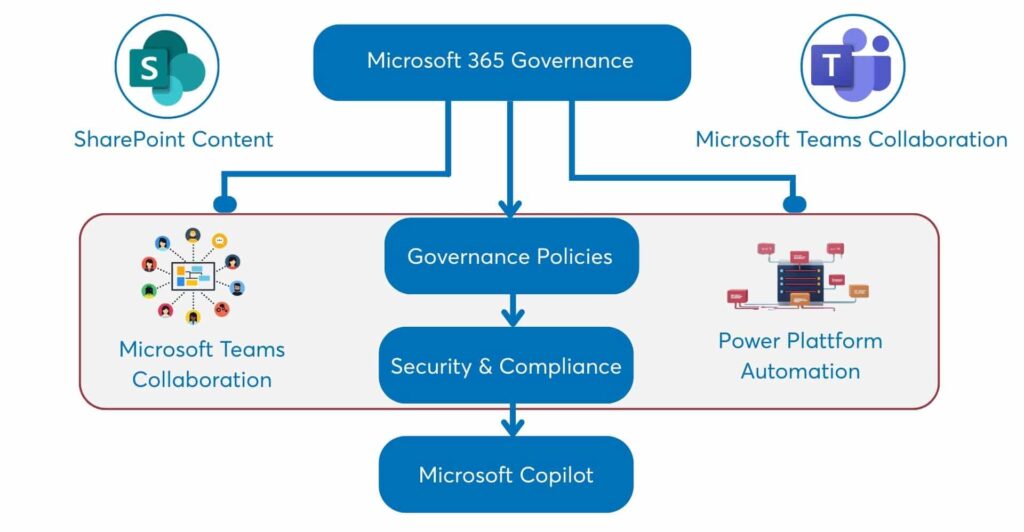
Yes. Content Governance complements the Collaboration (Workspace Governance) and Platform (permissions, costs, platform transparency) modules to form a comprehensive Microsoft 365 governance framework.
Your contact person
Get in touch directly with Daniel Griener, Lead Delivery

